
How to Give a University Presentation in English: From Outline to Q&A
Plan an English university presentation from its central question to clear slides, group handovers, rehearsal, and honest Q&A.
READ · TRY · CHECK · REPEAT
What you will practise
- Distinguish observations, interpretations and proposals.
- Practise a clear handover and an honest response to a question.
- Build a presentation outline with evidence and a limitation.
This records completed tasks, not a fluency score. Your writing and progress stay in this browser; they are not synced to an account or submitted to a server.
Imagine that your group has gathered plenty of information but your slide deck still feels confusing. Each person has added a section, the fonts differ, and the conclusion introduces a new idea. More content has not made the message clearer.
Start with the question your presentation must answer. Build an outline around that question, choose evidence that supports it, and rehearse the transitions and questions as carefully as the individual sections.
This guide covers a class or project presentation. Always follow your teacher's instructions for content, timing, citation, and assessment where they differ from a general suggestion here.
Read the task before designing slides
Identify the audience, purpose, time limit, and expected output. Are you explaining a concept, reporting a study, comparing options, or recommending an action? These tasks need different structures.
Write a one-sentence answer to the central question. For example: “We recommend a shared meeting record because it makes decisions and responsibilities easier to find.” This is a sample claim for an imagined project, not a finding about MBSTU students.
If you cannot state the answer yet, your next task is organising the content. Choosing colours will not resolve the missing argument.
Create an outline that follows the reasoning
For a recommendation, try problem, options, comparison, recommendation, and limitation. For a research report, your teacher may expect background, method, results, and discussion. Use the structure that suits the task.
An example outline for the imagined meeting-record project could be:
- The problem: decisions are scattered across messages.
- The proposed approach: one shared record with a clear final decision.
- The comparison: how the approach differs from informal messages.
- The limitation: someone must keep the record accurate.
- The recommendation: test the process during the next group assignment.
Each part should help answer the central question. Remove interesting details that lead to a separate topic unless the assignment requires them.
Decide what counts as evidence
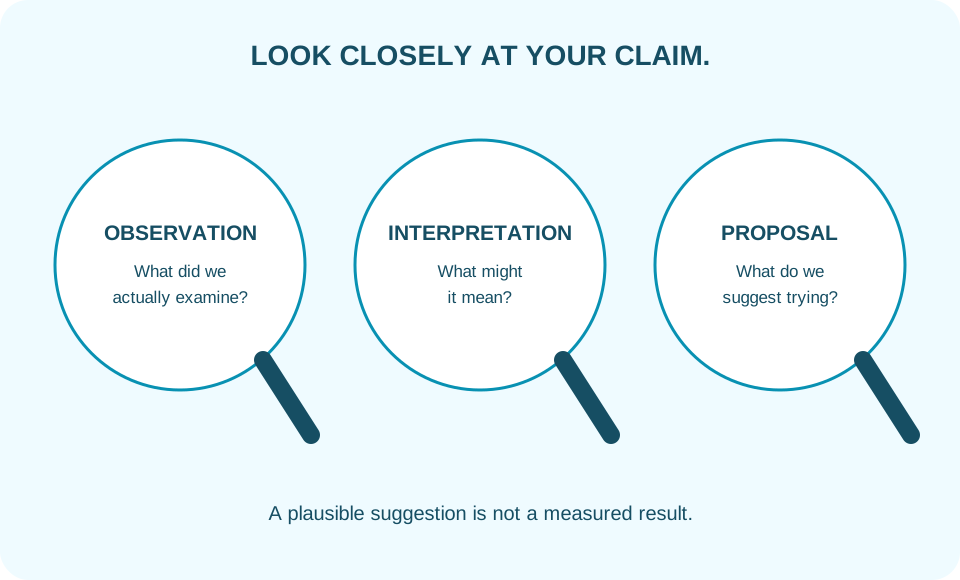
Separate observations, interpretations, and proposals. “We reviewed six meeting notes” describes what you did, if it is true. “Members may find one record easier to follow” is an interpretation or possibility. “We suggest a trial” is a proposal.
Do not present an imagined example as collected data. If you need demonstration numbers to explain a chart, label them clearly as hypothetical and keep that label visible.
When using outside information, record the source while preparing the slide. Follow the citation style required by your course. Check that the source actually supports the specific claim beside it, rather than merely discussing a similar topic.
Keep demonstration data honest
You invented numbers to demonstrate a chart format. How should you present them?
Show a hint
The audience needs to know whether the chart reports an actual observation.
Make slides support your explanation
Use each slide for a clear purpose: define a problem, show a comparison, illustrate a process, or present a result. A heading such as “One record makes the final decision visible” tells the audience more than “Discussion”.
Keep text readable from the expected viewing distance. Replace a dense paragraph with a short statement and the necessary evidence. You can explain the detail aloud or provide it in a separate handout if the assignment permits.
Charts need labelled axes, units, and a source where appropriate. Images need to contribute meaning. A decorative picture cannot substitute for an explanation of the result.
Read the slide in your actual presentation setup. What looks comfortable on a laptop may be difficult to read across a room or on a shared screen.
Write for speaking
Use sentences that you can deliver naturally. Compare:
“The implementation of an integrated communicative mechanism is necessitated by operational inefficiencies.”
“Our group needs one place to record decisions because the current messages are difficult to follow.”
The second version names the people, action, and reason. It is not less serious because it uses familiar language.
Define technical terms when the audience needs them. If a term matters to the subject, keep it and explain it. Replacing every technical word with a vague everyday word can also make an explanation less accurate.
Prepare transitions and group handovers
Connect sections with the relationship between them: “Now that we have identified the problem, let's compare two possible approaches.” This gives the audience a reason for the next section.
In a group, agree on the handover wording and the slide where it happens. For example: “I have explained our method. Farhan will now show the comparison.” Use the actual person's name and role.
Rehearse together at least once if possible. Separate rehearsals may not reveal repeated definitions, conflicting terminology, missing transitions, or a total time that exceeds the limit.
Rehearse to find decisions, not only mistakes
Time a complete run, including introductions and handovers. If it is too long, decide what the audience can do without. Cut a duplicated explanation before cutting a necessary limitation.
Ask a listener to name your main conclusion. If they cannot, improve the organisation or make the conclusion more explicit. Ask which slide required more time, and check whether you are moving on before explaining it.
Rehearsal also helps you decide where to pause, which term needs a definition, and whether a visual should be simplified. These are communication decisions rather than cosmetic corrections.
Handle questions in four moves
Listen. Allow the question to finish. Note the key point if it is long.
Clarify when necessary. Ask whether the question concerns the method, result, or recommendation. Do not answer a different question because it is easier.
Respond directly. Give the short answer first, then the explanation or evidence.
Acknowledge limits. Say what your work does not establish. “We did not compare those groups” is more accurate than inventing a comparison during the discussion.
For a group presentation, agree how questions will be shared. One person can invite the member responsible for that section to respond without creating a competition to answer first.
Practise the parts between the slides
Use this fictional rehearsal to practise a handover, clarification and a limitation. Replace names and responsibilities with genuine details for your own presentation.
Show a hint
Give the listener a reason for the next section. If your work does not answer a question, say precisely what is missing.
- A
- BThank you. We propose trying the list in one group assignment and recording which tasks need clarification.
- A
- BAre you asking whether we have tested it across departments?
- A
- BNo. This is a proposal, and we have not tested it across departments. A wider comparison would be needed before making that claim.
Prepare for a slide problem
Keep a concise outline available separately from the presentation file. Practise explaining the main message without pointing to a screen. If a chart is essential, know how to describe its key comparison in words.
You do not need to narrate every technical difficulty. Briefly explain the change: “I'll describe the comparison while we reopen the slide.” Then continue if the situation allows.
A backup supports communication, but it does not remove the need to test the equipment and file beforehand.
Exercise: turn a topic into an outline
Use this invented assignment: “Recommend a way for a student group to keep track of project responsibilities.” Prepare five slide headings and one question you expect from the audience.
A possible set is:
- “Our group needs a clear task record.”
- “Each task needs an owner and a check-in date.”
- “A shared list shows what is still unfinished.”
- “The record only helps if it stays up to date.”
- “Try the process at the next project meeting.”
A likely question is “Who updates the list?” Your answer should name a workable process, such as agreeing on a recorder and checking the list together. It should not assume that the tool maintains itself.
Draft five useful slide headings
Use the assignment in this section to write five slide headings. Add one anticipated question, a direct answer and one limitation.
Show a hint
A slide heading can state the point the slide explains. Keep invented examples clearly labelled.
This is not an automatic grammar checker. Use the checklist below to review your writing.
- Does the outline answer the assignment question?
- Does each heading have a distinct purpose?
- Have I separated genuine evidence from a suggestion or hypothetical example?
- Does the limitation say something specific the proposal does not establish?
- Have I timed a complete rehearsal including handovers and questions?
Check before presenting
Can you state the main message in one sentence? Does each section support it? Are examples and sources accurately labelled? Can the audience read the slides? Have you rehearsed the full timing, transitions, and a question?
Finally, check that the conclusion answers the opening question. A presentation feels complete when listeners can connect the problem, explanation, and next step.
For wording you can adapt, use the 50 presentation and discussion phrases. If preparation is being interrupted by worries about speaking, work through the presentation nervousness guide.